
การหากระเป๋าแล็ปท็อปที่สมบูรณ์แบบไม่ใช่แค่เรื่องของสไตล์หรือแบรนด์ – แต่เกี่ยวกับการรับรองว่าสิ่งที่มีค่าของคุณจะได้รับการป้องกันที่สมควรได้รับในขณะที่ยังคงรูปลักษณ์ที่เป็นมืออาชีพ อย่างไรก็ตามผู้คนจำนวนมากมักทำผิดพลาดที่มีค่าใช้จ่ายสูงในการเลือกกระเป๋าโดยอิงจากขนาดของแล็ปท็อปที่โฆษณาไว้เพียงอย่างเดียว เท่านั้นที่จะพบว่าสิ่งของของพวกเขาไม่พอดีหรือเลื่อนไหลอยู่ภายในช่องเก็บของ.
ผลกระทบจากกระเป๋าที่ไม่เข้ากันเกินกว่าความไม่สะดวกเล็กน้อย กระเป๋าที่เล็กเกินไปอาจทำให้มุมและขอบของแล็ปท็อปของคุณเสียหาย ในขณะที่กระเป๋าที่ใหญ่เกินไปมีการป้องกันไม่เพียงพอทำให้สิ่งของของคุณเคลื่อนที่และเสี่ยงต่อความเสียหายจากการกระแทก การมีรูปลักษณ์ที่เป็นมืออาชีพก็สำคัญมาก – ไม่มีอะไรดูด้อยลงไปกว่าการต้องดิ้นรนกับกระเป๋าที่ใหญ่เกินไปหรือให้แล็ปท็อปของคุณโผล่พ้นจากที่ห่อลดขนาดที่เล็กเกินไป.
ในคู่มือนี้คุณจะได้เรียนรู้ วิธีการวัดขนาดแล็ปท็อปสำหรับการเลือกกระเป๋า เข้าใจว่าขนาดหน้าจอที่โฆษณาอาจทำให้เข้าใจผิดได้อย่างไร และค้นพบกระบวนการทีละขั้นตอนเพื่อให้แน่ใจว่าการใส่พอดีทุกครั้ง สุดท้ายคุณจะมีความมั่นใจในการเลือกกระเป๋าที่ให้การป้องกันที่เหมาะสมและการนำเสนอที่เป็นมืออาชีพ.

เข้าใจขนาดแล็ปท็อป: นิ้วกับมิติจริง
นี่คือจุดที่หลายคนเกิดความสับสน: เมื่อผู้ผลิตกล่าวว่า “แล็ปท็อปขนาด 15.6 นิ้ว” พวกเขากำลังพูดถึงการวัดแนวทแยงของหน้าจอ ไม่ใช่ความกว้างหรือความสูงของอุปกรณ์จริง การวัดนี้จะถูกทำจากมุมหนึ่งของจอภาพไปยังมุมตรงข้าม คล้ายกับที่ใช้วัดหน้าจทีวี.
ระบบการติดฉลากนี้สร้างความไม่สอดคล้องกันอย่างมีนัยสำคัญเมื่อช้อปปิ้งกระเป๋า แล็ปท็อปขนาด 15.6 นิ้วไม่ได้มีความกว้าง 15.6 นิ้ว – ส่วนใหญ่มีความกว้างราว 14.1 นิ้ว และลึก 9.8 นิ้ว ขนาดที่แท้จริงขึ้นอยู่กับขนาดของกรอบ ตัวเลือกการออกแบบ และสเปคของผู้ผลิต ซึ่งแตกต่างกันอย่างมากระหว่างแบรนด์และรุ่น.
นี่คือเหตุผลที่การพึ่งพาขนาดจอแสดงผลที่ประกาศเพียงอย่างเดียวสำหรับการเลือกกระเป๋ามักจะนำไปสู่ผลลัพธ์ที่น่าผิดหวัง แล็ปท็อปสองเครื่องที่มีขนาดจอแสดงผลแนวทแยงเดียวกันอาจมีขนาดภายนอกที่แตกต่างกันอย่างเห็นได้ชัด ทำให้การ แนวทางขนาดกระเป๋าแล็ปท็อป ที่อิงจากการวัดจริงนั้นสำคัญต่อความสำเร็จ.
การเข้าใจความแตกต่างนี้คือขั้นตอนแรกในการตัดสินใจเกี่ยวกับความเข้ากันได้ของกระเป๋าแล็ปท็อป และรับรองว่าคุณกำลังวัดสิ่งที่สำคัญจริงๆ สำหรับการพอดีและการปกป้อง.

เครื่องมือที่คุณต้องใช้ในการวัดแล็ปท็อปของคุณ
ข่าวดีคือการวัดแล็ปท็อปของคุณอย่างแม่นยำไม่ต้องการอุปกรณ์ราคาแพงหรือพิเศษ ผู้คนส่วนใหญ่มีทุกสิ่งที่พวกเขาต้องการที่บ้านแล้ว.
สายวัดมาตรฐานหรือไม้บรรทัดเป็นเครื่องมือหลักของคุณ – ทั้งคู่ทำงานได้อย่างสมบูรณ์แบบสำหรับงานนี้ สายวัดให้ความยืดหยุ่นมากขึ้นสำหรับอุปกรณ์ขนาดใหญ่ ขณะที่ไม้บรรทัดให้ความแม่นยำสำหรับการวัดขนาดเล็ก การมีสมุดบันทึกหรือสมาร์ทโฟนใกล้ๆ เพื่อบันทึกการวัดของคุณจะช่วยป้องกันความรู้สึกหงุดหงิดจากการลืมตัวเลขกลางกระบวนการ.
สำหรับผู้ที่ต้องการความแม่นยำเพิ่มเติม โดยเฉพาะในสภาพแวดล้อมทางธุรกิจหรือเทคนิค ไมโครมิเตอร์ดิจิตอลสามารถให้การวัดที่แม่นยำถึงเศษมิลลิเมตร ระดับความแม่นยำนี้มีประโยชน์โดยเฉพาะสำหรับแล็ปท็อปที่บางเฉียบซึ่งทุกมิลลิเมตรมีความสำคัญสำหรับความเข้ากันได้ของซองและเคส.
หลักการที่สำคัญที่สุดคือการวัดอุปกรณ์จริง ไม่พึ่งพาสเปคของผู้ผลิต หมายเลขรุ่น หรือข้อมูลบรรจุภัณฑ์ แล็ปท็อปแม้จากสายผลิตภัณฑ์เดียวกันก็สามารถมีการเปลี่ยนแปลงเล็กน้อยในขนาด และการวัดในโลกจริงก็จะรวมเอาหนังป้องกัน เคส หรือความแตกต่างในการผลิตที่เฉพาะเจาะจงของอุปกรณ์ของคุณ.
ขั้นตอนทีละขั้นตอน: วิธีการวัดแล็ปท็อปของคุณ
ตอนนี้มาดูขั้นตอนที่แน่นอนในการวัดแล็ปท็อปของคุณเพื่อให้แน่ใจว่าขนาดของ ซองแล็ปท็อป และความเข้ากันได้ของกระเป๋า.
วัดความกว้าง (W)
ปิดแล็ปท็อปของคุณโดยสมบูรณ์และวางไว้บนพื้นผิวเรียบ วางเครื่องมือวัดของคุณที่ขอบซ้ายสุดและยืดออกไปยังขอบขวาสุด โดยวัดจากจุดที่กว้างที่สุดของอุปกรณ์ ซึ่งปกติจะเกิดขึ้นที่ฐานแทนที่จะเป็นหน้าจอ เนื่องจากหลายฐานของแล็ปท็อปมีความยืดออกไปเล็กน้อยนอกพื้นที่แสดงผล บันทึกการวัดนี้เป็นขนาดความกว้างของคุณ.
วัดความลึก (D)
สำหรับการวัดความลึก ให้จัดตำแหน่งเครื่องมือวัดของคุณจากขอบหน้าด้านหน้า (ที่คุณจะวางฝ่ามือระหว่างพิมพ์) ไปยังขอบด้านหลังที่ที่จอหงิกเข้ามา ต้องแน่ใจว่าแล็ปท็อปของคุณปิดสนิทในระหว่างการวัดนี้ เนื่องจากแล็ปท็อปที่เปิดจะให้การอ่านที่ไม่ถูกต้องซึ่งจะไม่สะท้อนถึงว่าอุปกรณ์พอดีกับกระเป๋าหรือไม่.

วัดความสูง/ความหนา (H)
เมื่อแล็ปท็อปปิดอยู่และนอนอยู่บนพื้นราบ ให้วัดจากฐานด้านล่างจนถึงจุดสูงสุดของฝาครอบด้านบน การวัดนี้มีความสำคัญ เพราะหลายคนมักจะประเมินความหนาของแล็ปท็อปต่ำเกินไป โดยเฉพาะกับแล็ปท็อปเกมหรืออุปกรณ์ที่มีแบตเตอรี่ขยาย ต่างของมิลลิเมตรเล็กน้อยก็สามารถกำหนดว่าแล็ปท็อปของคุณจะพอดีในซองหรือช่องใส่กระเป๋าอยู่สบายหรือไม่.
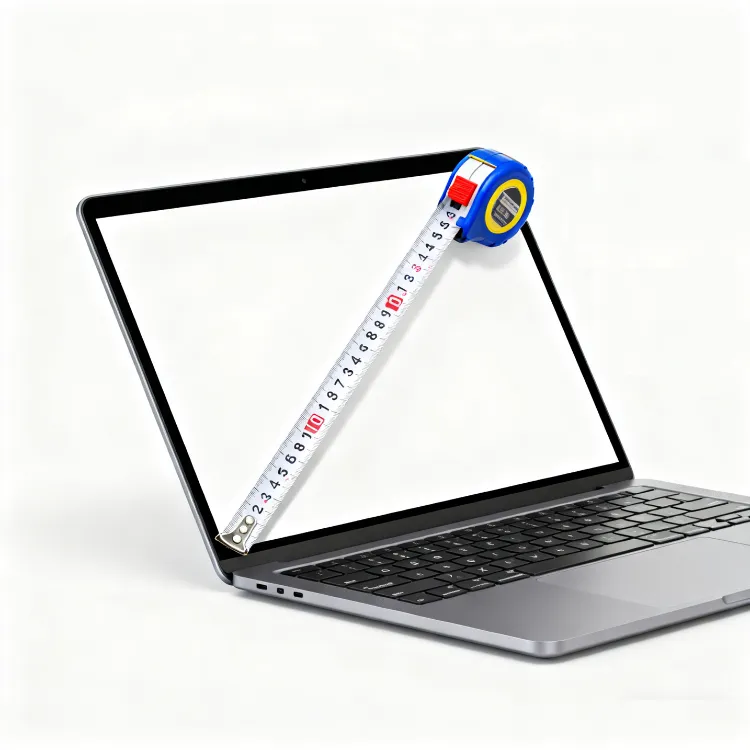
วัดแนวทแยง (ทางเลือก)
แม้ว่าจะไม่จำเป็นสำหรับการใส่กระเป๋า การวัดเส้นทแยงอาจช่วยยืนยันขนาดที่ประกาศของแล็ปท็อปของคุณและทำให้คุณมั่นใจในการวัดของคุณ วัดจากมุมหนึ่งของจอไปยังมุมตรงกันข้าม – สิ่งนี้ควรตรงกับขนาดจอที่ระบุของผู้ผลิต.
การมีข้อมูลอ้างอิงภาพช่วยได้มากในระหว่างกระบวนการนี้ ลองจินตนาการถึงการวางสายวัดของคุณตามขอบแต่ละด้านอย่างเป็นระบบเพื่อให้แน่ใจว่าคุณจับมิติสูงสุดในแต่ละทิศทางได้.
แปลงมิติแล็ปท็อปให้พอดีกับกระเป๋า
เมื่อคุณมีการวัดที่ถูกต้องของแล็ปท็อปของคุณแล้ว ขั้นตอนถัดไปคือการเข้าใจว่าคุณควรเผื่อพื้นที่เพิ่มเติมเท่าไรเพื่อให้มีความ แนวทางเข้ากันได้ของกระเป๋าแล็ปท็อป compatibility.
The general rule is adding 1-2 centimeters (approximately 0.5-1 inch) to each dimension for comfortable fit and protection. This extra space serves multiple purposes: it prevents stress on zippers and seams, allows for slight measurement variations, accommodates any laptop accessories or protective skins, and provides room for padding materials that protect your device.

Here’s a practical example: if your laptop measures 35cm × 24cm × 2cm, your ideal bag compartment should be approximately 37cm × 26cm × 3cm. This gives you enough wiggle room without creating excess space where your laptop could shift around during transport.
The consequences of ignoring this spacing principle are significant. Bags that are too tight put stress on your laptop’s edges and corners while making insertion and removal difficult and potentially damaging. Conversely, bags that are too loose provide inadequate protection, allowing your device to slide around and potentially suffer impact damage from sudden movements or drops.
Finding the sweet spot ensures your laptop slides in and out smoothly while staying securely positioned during transport.
ข้อพิจารณาเฉพาะตามประเภทกระเป๋า
Different bag styles require different fitting approaches, and understanding these nuances helps you make better decisions based on your specific needs.
ช่องใส่แลปท็อป
Sleeves are designed for snug fits with minimal padding, so they require the most precise measurements. Add only 0.5-1cm to your laptop dimensions for sleeves, as too much extra space defeats their streamlined purpose. The goal is protective coverage that maintains the laptop’s profile.

กระเป๋าเป้ที่มีช่องแล็ปท็อป
Backpack laptop compartments often include additional storage for accessories, so consider your complete carry needs. Measure not just the laptop compartment but also consider how thick the laptop section becomes when you add chargers, mice, or documents to other pockets.

กระเป๋ากล่องหรือกระเป๋าถือ
These bags require careful attention to interior organization and zipper openings. A bag might have adequate internal space but a zipper opening that’s too small for easy laptop access. Measure both the interior compartment and the opening dimensions.
กระเป๋าเดินทางหรือกระเป๋าธุรกิจ
TSA-friendly compartments have specific design requirements that affect fit. These compartments need to open flat for security screening, so they often require additional clearance space around your laptop.
เคล็ดลับในการเลือกกระเป๋าแล็ปท็อปที่สมบูรณ์แบบ
Armed with accurate measurements, you can now focus on finding a bag that matches both your device size and lifestyle requirements. The perfect how to choose laptop bag decision balances protection, functionality, and professional appearance.
Consider your daily routine: office workers might prioritize professional appearance and document storage, while students need durability and multiple compartments for books and supplies. Frequent travelers benefit from TSA-friendly designs and robust protection against handling by airport security.
Material quality significantly impacts both protection and longevity. Look for adequate padding around the laptop compartment, water-resistant fabrics for weather protection, and reinforced stress points where straps attach to the bag body. Quality zippers and hardware prevent failures that could result in dropped devices.
For businesses seeking custom solutions, OEM and ODM options allow you to create bags with specific interior dimensions, branding elements, and functionality tailored to your organization’s needs. This ensures perfect fit for standard company devices while maintaining brand consistency.
ข้อผิดพลาดทั่วไปที่ควรหลีกเลี่ยง
Learning from others’ mistakes saves time, money, and frustration. Here are the most frequent errors people make when selecting laptop bags.
The biggest mistake is relying solely on model names or advertised screen sizes without taking actual measurements. “MacBook 15” or “Dell 14-inch” tells you very little about the specific dimensions of your device, especially when manufacturers frequently update designs and dimensions within the same product line.
Ignoring thickness is another critical oversight, particularly with gaming laptops, mobile workstations, or devices with extended batteries. These laptops can be significantly thicker than ultrabooks, and a bag that accommodates the length and width perfectly might not zip closed due to height constraints.
Many people also forget to account for laptop accessories in their calculations. If you always carry your charger, mouse, or additional adapters with your laptop, factor these items into your space requirements. A perfectly sized laptop compartment becomes inadequate if you can’t fit your essential accessories.
แผนภูมิขนาดแล็ปท็อปแบบอ้างอิงด่วน
นี่ laptop measurement chart provides approximate dimensions for common laptop sizes, but remember that actual measurements can vary significantly between manufacturers and models.
| Laptop Size | Approximate Dimensions (cm) | Suggested Bag Interior Size (cm) |
|---|---|---|
| 13-inch | 30.4 × 21.2 × 1.5 | 32 × 23 × 2.5 |
| 14-inch | 32.5 × 23 × 1.8 | 34.5 × 25 × 3 |
| 15.6-inch | 36 × 25 × 2 | 38 × 27 × 3.5 |
| 17-inch | 41 × 28 × 2.5 | 43 × 30 × 4 |
Use this chart as a starting point, but always verify with your own measurements for the most accurate results. Variations in design, bezels, and manufacturing can create significant differences even within the same nominal size category.
บทสรุป
Measuring your laptop correctly is the foundation of finding a bag that provides excellent protection while meeting your professional and practical needs. By taking accurate measurements of width, depth, and thickness, then adding appropriate clearance space, you ensure your laptop fits comfortably without the risks associated with bags that are too tight or too loose.
Remember that the advertised screen size is just a starting point – real-world dimensions vary considerably between models and manufacturers. Taking five minutes to measure your specific device saves the frustration of returns, exchanges, and potentially inadequate protection for your valuable technology investment.
The small effort invested in proper measurement pays dividends in device protection, professional appearance, and daily convenience. Whether you’re carrying a lightweight ultrabook or a powerful gaming laptop, the principles remain the same: measure accurately, allow appropriate clearance, and choose bags designed for your specific use case.
Once you know your laptop’s exact dimensions, explore our range of custom laptop bags designed to fit perfectly and protect your device – whether for office use, retail display, or corporate gifting. Our collection includes options for every size requirement and professional setting, ensuring your technology investment stays safe and looks great.
แท็กยอดนิยม: ถุงผ้าซื้อของแบบไม่ทอ เคลือบตามสั่งในราคาส่ง จีน, ซัพพลายเออร์, ผู้ผลิต, โรงงาน, ขายส่ง, ขนาดใหญ่, สำหรับขาย, ถุงผ้าอนามัยที่เป็นมิตรกับสิ่งแวดล้อม, กระเป๋าผ้าฝ้าย, ถุง rpet, กระเป๋าแบบพับได้, กระเป๋าชุดผ้าฝ้าย, กระเป๋าผ้าฝ้ายแบบสายรู,กระเป๋าเก็บความเย็นแบบฉนวน,กระเป๋าเครื่องสำอางผ้าใบ,ถุงผ้าแบบไม่ทอที่มีโลโก้
 Thai
Thai  English
  French
  German
  Japanese
  Arabic
  Vietnamese
  Russian
  Spanish
  Portuguese